City of BugsVille
Police
Academy
Bureau of Officer Training & Field Readiness
“Your badge is new. Your uniform is pressed. This is everything you need to know before you hit the streets.”
Welcome, Citizen
BugsVille Police Department · Public Information
The BugsVille Police Department is the city's primary law enforcement agency. Our officers patrol the streets, respond to emergency calls, enforce traffic laws, investigate incidents, and keep the peace across every district of BugsVille.
This is the Police Academy, the training manual covering everything from filing violations and understanding citizen ratings to navigating internal affairs and working with dispatch. Whether you're considering joining the force or just want to understand how the BPD operates, you're in the right place.
Protect & Serve
Est. 2026
Read through the academy materials below, then submit your application when ready.
Academy materials are public record. All citizens are encouraged to review them.
Rank Progression
Prove yourself through service. The city recognizes dedication.
BPD ranks are earned through a combination of tenure, violations filed, commendations given, BOLOs, and court participation. Every officer starts as a Cadet and works their way up. Ranks update automatically every few minutes -- there's no manual promotion process. Hit the thresholds and you'll see your new rank on the roster and in your role badge.
Cadet
Starting rank
Officer
7+ days, 5+ violations
Senior Officer
30+ days, 15+ violations, 5+ commendations
Corporal
60+ days, 30+ violations, 12+ commendations, 2+ BOLOs
Sergeant
90+ days, 50+ violations, 25+ commendations, 5+ BOLOs, 2+ court cases
Staff Sergeant
120+ days, 80+ violations, 40+ commendations, 10+ BOLOs
Lieutenant
180+ days, 130+ violations, 65+ commendations, 18+ BOLOs, 5+ court cases
Captain
270+ days, 200+ violations, 100+ commendations, 30+ BOLOs
Deputy Chief
365+ days, 300+ violations, 150+ commendations, 45+ BOLOs, 8+ cases won in court
Internal Affairs and your rank
Sustained IA complaints do not touch your rank. They stay on your record and stay visible to Overwatch, but the promotion math ignores them: hit the thresholds and the rank posts, same as anyone. Genuine misconduct is Overwatch's department, not the rank table's. Stay professional anyway, the record is public.
Code of Conduct
Wear the badge with pride. Act like it means something.
The Rules
No Power Tripping
Don't file violations just because you can. Every violation should be based on something you actually witnessed or have evidence for.
Proportional Response
Match the severity to the actual offense. A minor parking issue is not a Major violation. IA watches for this.
Be Professional
You represent the BPD. No toxicity, no harassment, no ramming civilians with your vehicle. Keep it clean.
No Targeting
Don't single out players. If someone's getting multiple violations, make sure each one is legitimate and documented.
Document Everything
Evidence is your best friend. Screenshots, bodycam footage, detailed descriptions. Good documentation protects you and the department.
Respect Wanted Status
Only pursue a citizen if they are actively marked as wanted in-game, or you have a mutually agreed-upon RP reason. If they're no longer flagged and driving normally, the pursuit is over. Back off.
Lights & Sirens Discipline
Do NOT leave your lights or sirens on when parked, using autopilot, or AFK. It causes confusion and unnecessary disruption for other players.
Server Rules Apply to You Too
When It Stops Being RP
Regular IA complaints are role-play and won't cost you your badge. But officers who genuinely abuse their power, file false violations, or engage in toxic behavior will be escalated to Overwatch by IA, and that can result in removal from the BPD. Your badge is a privilege, not a right.
Personal Vehicle Policy
A police paint job is not a police car.
Plenty of officers keep a personal vehicle dressed in BPD colors, and the new light kits have made them popular. This section puts the line the department has always operated on in writing: official police work happens in an official police vehicle.
The Marked Unit Rule
Stops, citations, arrests, pursuits, and dispatch responses are conducted in a marked BPD unit, the vehicles your Police role unlocks. The marked unit is what tells citizens, fellow officers, and admins that a real officer is working. In anything else you are, as far as the city is concerned, a civilian in a very convincing costume.
Fine on Your Own Time
Police liveries and light kits
Dress your personal ride however you like. Cosmetic is cosmetic.
RP traffic stops
Pulling someone over in a personal cruiser is fine when both players know it's roleplay. Make the RP intent clear before you light anyone up.
Off-duty driving
Cruising in your personal cruiser between shifts is allowed. Just don't work out of it.
Never From a Personal Vehicle
- Traffic stops, citations, or arrests as actual police work
- Joining or starting a pursuit. The moment a chase begins, personal vehicles are out.
- Responding to dispatch calls as the acting officer
Chase someone in a personal vehicle and you are not an officer in pursuit. You are a civilian ramming another civilian, and reckless driving rules apply to you.
Suspect Getting Away?
If your marked unit is across town and a suspect is escaping, that is what the BOLO system is for. See the below for how BOLOs work.
Fair Warning
This rule spent a long time as word of mouth before it reached the Academy. First offenses are handled with a reminder and a pointer to this page. Officers who keep working out of personal vehicles after a warning are Internal Affairs territory.
General Field Reminders
Standing orders from the Department. Read them, know them, follow them.
No-Parking Enforcement
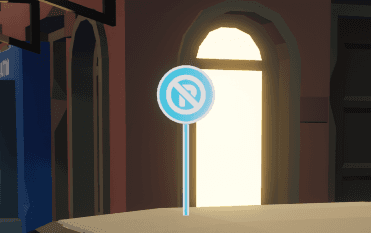
If you observe a vehicle parked near one of these signs, in a designated No Parking zone, mark it for towing. This supports the Department of Transportation by generating additional revenue and XP for the city.
How to Mark for Tow
While inside your patrol vehicle, press X to tag the illegally parked vehicle for tow. The Department of Transportation takes it from there.
Impound to the Station
Officers at police level 10 or above have a second option. Open the Roadside Service menu in your police car and choose Tow to nearest police station to bring the vehicle in yourself instead of waiting on a DOT wrecker. Use it when the vehicle is blocking traffic and no tow operator is on shift.
Exception for Campy's: You may see Campy's parked in no-parking zones. These are spawn points and should be left alone. Do not mark Campy's for towing.
Server Performance Awareness
If you encounter a situation that may be negatively impacting server performance, say a flatbed hauling an unreasonable number of objects (50+ presents), do not attempt to intervene or manage it yourself.
Standard Operating Procedure
- 1.Continue your patrol or assigned duties as normal.
- 2.Notify any available admin via in-game message with a brief description of what you observed and its location.
- 3.Your role in these cases is observation and reporting only. Admin will handle any necessary corrective action.
Working With Other Units
Two things the city put in place that change how you run a shift.
Officers on the in-game map
Every officer shows up as an icon on the in-game map, visible only to police. Check it before you call for backup so you know who is actually close.
Civilian ride-alongs
Citizens without the Police role can now sit in a police car as passengers. That covers transporting a cooperative suspect, giving a stranded citizen a lift, or running a ride-along scene.
Pursuit Policy
Officers may only initiate a pursuit under the following conditions. Always give suspects time to safely pull over. If they comply, issuing a warning is recommended. Escalation must be reasonable and gradual.
Wanted status is active
The citizen is currently marked as wanted in-game. This is the primary and most common justification for a pursuit.
Active traffic offense
The citizen is actively committing a traffic offense: reckless driving, running red lights, illegal U-turns, and so on. You witnessed it happen.
Mutual RP agreement
Both parties have agreed to an RP scenario that involves a chase or continued interaction. If in doubt, assume they are not interested.
Gradual escalation only. If a suspect refuses to stop, that does NOT give you the right to immediately PIT or ram. Maintain a safe following distance, use lights and sirens, and give them time to comply. Spike strips are banned on BugsVille and are not permitted under any circumstances.
If no condition is met, stop. If a citizen was speeding but got away cleanly, is no longer wanted, and has resumed normal driving, the encounter is over. Continuing to press the stop crosses the line from enforcement into harassment.
Roadblocks and checkpoints
Roadblocks and checkpoints get their own rules, separate from the pursuit conditions above. Three types of block, plus the ground rules that apply to all of them.
Pursuit roadblocks
Same gate as a pursuit: only set one up against a suspect with active wanted status. Partial blocks only, an escape lane has to stay open, no full closures of a road or highway. The officer who deployed it stays with the block and clears it the moment it no longer serves the pursuit: the suspect has stopped, the suspect has passed the block, or the pursuit is over. The vehicle classes protected from PIT maneuvers under Job-Based Protections may not be roadblocked either.
A roadblock is set
Stationary, lights and siren on, placed where the suspect can see it with reasonable distance to stop, all before the suspect arrives. Repositioning to a new stationary spot further up the route is allowed. Steering into a suspect's path as they arrive isn't a roadblock, it's a blocking maneuver judged under the no-ram escalation rules above. If a block couldn't reasonably be stopped for, it wasn't a proper roadblock, and the recklessness reads against the officer.
Weight checkpoints
Attended and set up at fixed, sensible locations like weigh stations, with a bypass lane open for cleared traffic and kept short. Run them jointly with the DOT where you can. Citizens are required to stop at an attended checkpoint under Traffic Code 1.3.1.1.
Unattended roadblocks
An unattended block isn't a checkpoint, it's just an obstruction. Citizens can lawfully drive past it under Traffic Code 1.3.1, and leaving one sitting on the road is itself citable.
Unresponsive drivers
An unresponsive driver on autopilot isn't fleeing, flight requires intent. If they're not the pursuit suspect, open the lane and let them roll through: no citation, no contact. Clearing genuinely absent drivers from a full server is a job for the city's AFK systems, not the roadblock's.
Cross-reference. Deployment rules for roadblocks live here in the Academy. What a citizen owes at an attended stop is covered separately, in Traffic Code 1.3.1.1.
Vehicles and barriers only. A roadblock means vehicles and barriers, nothing else. Spike strips remain banned in all circumstances, the same rule as under Pursuit Policy above.
Job-Based Protections
The following jobs are protected from aggressive police action. These vehicles often carry cargo or passengers, and one collision can undo an entire run.
Tow Truck
Carrying cargo
Taxi
Carrying passengers
Limo
Trip comfort score at stake
Live Fish Tank
Fragile cargo
No ramming, PIT maneuvers, or physical contact with these vehicles during a pursuit. If they don't stop, follow them until they reach their destination, then write a ticket if appropriate.
Use good judgment. Passenger comfort is now scored across the whole trip. Hard braking, sharp turns and collisions pull the score down, and a smooth stretch of driving pulls it back up. The driver watches it live on the HUD, and it feeds the rating and the tip at the end of the run. Ramming a working taxi knocks down the passenger's comfort score and the driver's rating and tip, and sustained rough handling is what really wrecks a run. If your actions could damage a delivery or a fare, do not engage aggressively.
Remember: You're an officer, not an engineer. If something looks like it's straining the city's infrastructure, report it up the chain and let the admins handle it. Keeping things running smoothly is a team effort.
The Precinct Dashboard
Your eyes and ears. Know it like the back of your hand.
When you open the Precinct, here's what you're looking at:
Stats Bar
Four cards across the top showing violation counts: last 24 hours, this week, this month, and all-time total. Quick pulse check on department activity.
Recent Violations
A live feed of the latest violations filed by all officers. Each card shows the case number, severity, officer, and citizen involved. Click to expand for full details, evidence, and bodycam footage.
Sidebar
Right-side panel with online players (green = online), offline player search, the Officers On Duty list, and a 30-day severity breakdown chart.
Finding Players
Online players show up automatically in the sidebar. For offline players, type at least 2 characters in the search box to search the database. You can click any player to view their full file or quick-action buttons to file a violation or give a commendation. Use the View Dossier button to open their full citizen dossier.
Shift Clock & Duty Log
Clock in when you hit the streets. Clock out when you're done. Simple.
Every department member can clock in and out of duty shifts directly from the Precinct. Your shift history is tracked automatically: total hours on duty, shift start/end times, and duration are all recorded for your service record.
When you're on duty, you appear on the Officers On Duty panel in the Precinct sidebar with a live timer showing how long your current shift has been running.
How It Works
- 1.Open the Precinct Dashboard and locate the shift clock button
- 2.Click "Clock In" to start your shift and a live timer begins
- 3.Go about your patrol, respond to calls, file violations
- 4.When you're done, click "Clock Out" to end your shift
- 5.Your total hours are recorded and added to the leaderboard
What the Button Looks Like
Off Duty
When you're not on duty, you'll see a subtle “Go On Patrol” button in the top-right area of the Precinct header, next to the Duty History and Academy buttons. Click it to start your shift.
On Duty
Once you're on duty, the button is replaced with a green pulsing indicator, a live timer showing your shift duration, and a “Clock Out” button. Click Clock Out when your shift is done.
Where to find it: The duty button sits in the Precinct header bar, right next to the Duty History, Academy, and Transparency buttons.
Live Shift Timer
Your active shift shows a running clock visible to you and other officers in the sidebar.
Duty History
Full log of every shift you've worked with per-shift stats: km patrolled, violations, commendations, BOLOs, and court cases. Includes analytics and leaderboards.
Duty Leaderboard
Department-wide ranking by total hours served. See how your dedication stacks up against the rest of the force.
Pro tip: Make it a habit to clock in at the start of every session. Consistent duty hours are factored into rank progression reviews and show IA that you're an active, dedicated member of the force.
No rule requires it, but clock in anyway. Nothing says you have to be clocked in or in uniform to perform police duties. Dispatch and duty tracking only see officers who clock in, so if you're not on the clock, the department can't see you working.
Two officers on one incident, two duty reports
When a BOLO hands an incident from one officer to another, each of you logs your own half. The originating officer (the one who witnessed the incident and filed the bulletin) logs the original incident and the BOLO's creation. The apprehending officer logs locating and apprehending the subject, resolving the bulletin, the citation or arrest that came out of it, and any offenses they witnessed themselves during the pursuit. Neither of you writes up the other's incident a second time.
Filing Violations
The core of your job. Do it right, do it by the book.
When you witness a violation, here's the procedure from start to finish:
Find the Player
In the Precinct sidebar, find the player from the online list or search for them. Click their name to open their subject file. From here you can hit the "File Violation" button to start the violation form, or use "View Dossier" to review their full record first.
Select Violation Type
Pick the category that best fits what you witnessed. Here are all 24 violation types:
Speeding, running reds, wrong-way driving
Dangerous maneuvers, swerving, excessive speed
Organized or impromptu racing on public roads (Ordinance §18)
Collision followed by fleeing the scene
Attempting to escape a police stop or pursuit
Blocking roads, slow-rolling, parking in lanes
Loose or unsecured loads on flatbeds or trailers (Ordinance §17)
Exceeding weight limits on roads or bridges
Missing lights, broken equipment, unsafe modifications
Parking in restricted zones or blocking access
Vehicle left unattended in a public area or blocking access
Trailer left unattended in a public area or blocking access
Driving under the influence (erratic behavior)
Excessive honking, engine revving, disturbances
Heated arguments, threats, verbal abuse
Assault, fighting, physical confrontation
Damaging buildings, fences, infrastructure
Intentional destruction or defacement
Stealing vehicles or property
Repeated unwanted behavior targeting someone
Possession of illegal or controlled substances
Forcibly detaining or transporting someone
Lingering in restricted areas without purpose
Anything that doesn't fit the above categories. Officers may attach a free-text label describing the specific charge
Filing an Overweight Vehicle? Check the tonnage first.
Before you cite a hauler for exceeding a weight limit, verify the numbers. ChonkCheck adds up any vehicle, trailer, and cargo combination and weighs the total against the legal limit, including posted bridge and road restrictions. Quote the tonnage in your report and the citation holds up in Municipal Court.
Set Severity
This determines how many points are deducted from the citizen's rating. Choose carefully. Severity affects real consequences.
First-time or low-impact infractions, verbal cautions put on record
Jaywalking, minor parking violations, noise disturbances
Reckless driving, verbal disputes, minor property damage
Hit and run, assault, significant property damage
Repeated offenses, extreme violations, warrant-level offenses
Write the Report
Describe what happened in at least 20 characters. Be specific: include what you saw, where it happened, and any context. Good reports make for good cases.
"Subject was observed driving at excessive speed on Main Street, weaving between oncoming traffic. Nearly collided with two civilian vehicles before fleeing south toward the industrial district."
Add Evidence
Drag & drop, paste with Ctrl+V / Cmd+V, or use the file picker. Evidence images appear as thumbnails on the violation card.
Paste a YouTube link and it'll embed directly in the violation card. Great for showing the full context of an incident.
Location & Extras
Location
Type a location or click the map to mark exact coordinates.
Link CAD Call
If this came from a dispatch call, link it so the violation references the original call.
Create DOT Call
If infrastructure was damaged, you can auto-create a DOT call so they handle repairs.
Submit & Case Filed
Hit submit and the system takes care of the rest. A unique BPD-2026-XXXX case number is generated, the citizen's rating is updated, the violation is posted to the Police Blotter on Discord, and an in-game chat notification is sent. You did your job, Officer.
"Above the Law" Protection
Mega Patrons who have opted in to Above the Law status are protected. You cannot file violations against them, the form will block you. This is by design. They always show a perfect A rating. Don't take it personally.
What to Charge
The whole traffic code, one line per rule, with the charge on it.
The BugsVille Traffic Code runs past fifty thousand characters. That is a fine thing to have when a solicitor is picking at your citation in Municipal Court, and a poor thing to have when the truck is still rolling. Below is the same law at roadside speed: every rule, compressed, each line carrying the charge type to file and the clause numbers to quote in your notes.
Nothing here is new law and nothing has been left out. All 237 sections and lettered clauses of the long code sit in one of these 59 lines. Where the two ever disagree, the long code wins, and it is the one to cite when a citation is contested.
You never type a point value
The form asks for the charges and one severity. The points come off the severity, and these five numbers are the whole scale. There is no points box, no custom number, and no charge that carries points of its own.
Severity is your judgement, not a property of the offence. The same charge is a warning at low speed on an empty road and severe when it puts a citizen in a ditch. The lines below name the charge and leave the severity to you, because the code does not set one.
- •An active overweight permit blocks an Overweight Vehicle filing outright. Check the permit before you write it.
- •A DUI suspends the licence for 3 days and a Hit and Run for 5 days, automatically. You do not file the suspension.
- •Filing five charges on one ticket still assesses one severity and one point value. Stack the charges to record what happened; the score is not multiplied.
Part 1: general provisions
Areas with intense traffic means any road posted 120 km/h (75 mph) or higher, any city or village, or any spot where three or more civilian vehicles are in the immediate vicinity. Overwatch is the highest internal authority in BugsVille, is not police, and does not answer to the BPD's restrictions or chain of command. High-value cargo means Terra for sale or delivery, 50MVA and 20MVA transformers, the 250kl tank, and steel coils.
Any citizen may operate a motor vehicle safely. A suspended licence or a learner permit still allows vehicles under 5t gross weight and under 300hp, and also medium and heavy-duty trucks, buses and special equipment under 50t gross weight.
No charge type exists for unlicensed or suspended driving; suspensions are tracked separately
A citizen travels freely unless a law is broken, may safely pass an unattended obstruction (a barrier, wreck, stopped vehicle or roadblock with no officer at it), and may leave a box-in caused by another citizen by the safest route.
A roadblock or checkpoint with an officer present and signalling is a lawful stop and must be obeyed.
File: Fleeing Law Enforcement
Lack of proof means the citizen is innocent.
Local BugsVille time is the recognised clock for every report, citation and hearing, whatever time zone anyone is in.
Conduct the code does not name is cited under the nearest clause that governs conduct like it. A gap is an instruction to find the closest fit, not a free pass.
Part 2: traffic rules
Every citizen keeps full and complete control of their vehicle at all times.
File: Reckless Driving
Speed limits are safety suggestions, so speed alone is not the charge. A citizen or an officer who believes a speeding vehicle creates a hazard may act on it, and any accident involving a speeding vehicle is chargeable.
File: Traffic Violation, escalating to Reckless Driving
Stop signs carry the force of yield signs. Inside cities, and where one is posted ahead of a blind turn, the driver slows and confirms it is safe. Any accident involving a missed stop sign is chargeable.
File: Traffic Violation
Mandatory in busy areas. Any accident involving an unsignalled manoeuvre is chargeable. Emergency vehicles running sirens on a call are exempt.
File: Traffic Violation
BMWs are immune to the use of turn signals. There are no BMWs in BugsVille. We have Cora and Zino.
Jake brakes are banned in cities and villages at all times, and near residential property at night. I4 engines above 4,000 rpm and V6 or V12 engines above 3,000 rpm are banned in cities and villages at all times.
File: Noise Disturbance
Covers private and government property alike, including stop signs, fences, poles and similar municipal fixtures. Hit and run is property damage by a vehicle.
File: Property Damage; Hit and Run for 2.6.1
Five or more distinct traffic violations in one incident, or any failure to maintain control under 2.1.
File: Reckless Driving
An overtake is allowed only when the lane used is clear of obvious hazards. It is forbidden in cities and intense traffic unless there is room to pass without crossing into the opposite lane, and forbidden on the right. Exception: the vehicle being passed is 20 km/h or more under the limit.
File: Traffic Violation, escalating to Reckless Driving
A passed vehicle that accelerates, blocks the safe route or otherwise wrecks an overtake already under way is chargeable.
File: Traffic Violation, Reckless Driving, or Physical Altercation for a deliberate ram, by severity
Every vehicle must be of proper width, size and lighting for public roads. Not road legal: a factory-standard vehicle built without headlights, taillights or turn signals; a factory-standard vehicle built to use a heavy-machinery engine; any lighting modification that makes the vehicle harder to spot at night or in rain.
File: Improper Vehicle Equipment
It may be transported by rollback, carry, lomax or SPT1 with its axles off the road, and it may be operated away from public roads in the areas it was designed for.
On while moving on public roads from 19:20 to 07:00 and in fog or rain. An accident that the missing lights caused, or that they would have prevented, lies on the driver.
File: Improper Vehicle Equipment, plus the accident charge
Colours communicate, and none of the single colours communicates alone. Abuse of protection-giving lights is a moderate violation. A driver running them produces photographic evidence of the delivered urgent cargo on request, taken when payment is issued, and an officer’s reasonable suspicion that there is no destination removes the protection. The trucker follows the route to the delivery point.
File: Improper Vehicle Equipment for the lights; the protection itself is a Part 3 matter, see 3.4
BugsVille is right-hand traffic. With no sign or traffic control present, yield to the right. Every citizen is equal in the right and freedom of travel. On-duty emergency vehicles have priority during an active response or official matter, and that priority is not a defence: the emergency vehicle is legally at fault for a collision it causes, or for manoeuvring so suddenly that nobody could react.
Traffic control has no right of way. It may close or partly close a road only when absolutely necessary, and 1.3 comes first. BPD officers on active duty outrank a road closure.
A road closure that is unlawful or thinly justified is chargeable.
File: Impeding Traffic
Part 3: conduct of the police department
Good sportsmanship is mandatory. No metagaming, and no using the city map to locate a suspect. Roleplay logic holds at all times: if an interaction departs from it, every piece of evidence collected in it is deemed fabricated. A citizen who establishes they were in a stolen or rented vehicle, where the officer never confirmed identity through roleplay, puts the BOLO on the registered owner instead. Act on Ordinance §11 of the Municipal Code of Conduct.
Use of force is always safe and controlled. No PIT in cities or intense traffic. Exception: a suspect who deliberately drives through restricted areas to use civilian traffic or a populated zone as a shield while refusing to stop.
Outside city limits the PIT is allowed once the Academy escalation standard is met: valid pursuit conditions, lights and sirens running, and time given to comply. Country roads follow the same standard, and challenging curves or limited visibility raise the bar for safe execution. Highway areas with clear visibility are allowed. Country roads means challenging curves, limited visibility and a direct connection to villages; highway areas means fast roads and bridges, which are not country roads whatever they look like. The old speed caps on the PIT are repealed; the Academy sets no speed threshold and safe execution under 3.2 governs.
Head-on collisions and side rams during turns are restricted as unsafe.
Collateral damage to an uninvolved citizen from an officer's mistake, PIT or other unintended manoeuvre is prioritised over the chase by at least one officer, on or off duty. Sustained reasons to keep chasing instead: active AP status with no response, verbal confirmation that the citizen is willing to let it go, or the citizen's own fault. Act on Ordinance §11 of the Municipal Code of Conduct.
Clear visibility, active emergency lights (siren optional), no violation of 1.3 so the road stays partly open, and reasonable time for the suspect to react and slow down.
Place the driver's side of the cruiser away from the expected impact. No passengers in a police cruiser during a roadblock unless they got in uninvited. The cruiser never strikes the suspect: adjusting position to block is allowed, the suspect hitting the cruiser is a successful block, the cruiser hitting the suspect is misconduct.
Perfect execution means the suspect fully stopped or immediately boxed in by other units. The officer stays inside the cruiser the whole time the block is active, and removes it the moment the suspect passes or turns away, then returns to patrol, joins the pursuit, or sets the next block. Roadblocks are restricted in intense traffic, near emergency entrances and near private property, as per 3.2.1.1. An officer with a reasonable concern under 3.3.1-C keeps the cruiser stationary or removes it.
Job-Based Protection was written with Dl-Dan, who did most of the work on it. Protection exists to keep the city's logistics working, and it follows the job, not the model: any vehicle running a protected job counts, so check the work, not the body shape. The list is in the Police Academy Handbook. Protected vehicles are immune to aggressive manoeuvres. Urgent transport outranks mere comfort or fragile transport. The preferred enforcement is to follow the vehicle to its destination and make the stop, arrest or citation after the job is complete. Any use of force against a protected vehicle is well documented and justified, and goes to Internal Affairs under strict review.
Protection is presumed to hold unless the officer can justify its expiry, and the justification rises with the uncertainty and the risk. Four grounds: the job is inactive and the officer conclusively establishes and documents it (a taxi light in SEARCH, a bus with no route, a wrecker neither towing nor transporting); the job was abandoned through sustained inconsistent behaviour (repeatedly changing direction with no destination, abandoning a route, bypassing required stops); the officer holds sufficient evidence of a lack of urgency and gave adequate time to stop safely, which allows careful aggressive manoeuvres and final warnings without causing harm; or the vehicle poses an ongoing, severe threat to public safety.
With sufficient reasoning and evidence that the job could not have been completed without violating the cited charges, those charges are subject to dismissal in court. An officer who invokes 3.4 accepts the risk and the responsibility of stepping away from the handbook.
A traffic stop is a stop of a cooperative suspect. A stop that causes an impediment or a hazard is itself a traffic violation, and the officer first asks the suspect to move somewhere safer. A stop is not an arrest until the arrest is announced and committed.
A police cruiser behind a civilian with the siren on is following, and the civilian slows and pulls over. Silent following may be used to observe behaviour or collect information in confusing circumstances, and it does not satisfy 3.6.1-A on its own. If a reasonable time to pull over was given, per the Academy handbook, what follows is a chase and aggressive manoeuvres are available.
Active wanted status on a BPD-issued ALM, a traffic violation, active avoidance of commonly used roads, or a match to an active BOLO.
Detention and arrest come after an escalation beyond a standard stop. Grounds: refusal to stop under 3.5.4, property damage, hit and run, all involving unprotected vehicles; and multiple hit and run offences or other hazards to public safety that remove protection status.
Apprehend when the suspect has come to a complete stop, has switched vehicles using a parking spot, or has visited a repair shop. A suspect using a clean getaway (a rental, a vehicle prepared in advance, a designated driver) that was previously unmarked and is committing no traffic violations has disengaged, and the officer returns to patrol.
Necessary force takes the suspect into police custody. A suspect who flees in a vehicle after being apprehended has refused lawful procedure and may be processed in absentia as if the arrest had completed. A suspect who flees on foot may be met with deadly force, and is then assumed shot, transported to hospital, and placed under arrest.
Part 4: parking and unattended vehicles
A vehicle with a licensed operator in the driver's seat, nearby, or inside and asleep, stopped briefly or for the reasonable duration of official business, impeding no traffic and creating no hazard, is standing. Standing is not a charge.
A vehicle in a designated spot with engine and lights off is parked, and a parked vehicle is not an illegal parking charge. Outside city limits, pulled over parallel to but not crossing the white line, engine and lights off, is also parked.
Illegally parked: two or more vehicles of one owner parked close together; a vehicle longer or wider than the spot it occupies; anything blocking or limiting access to a fire hydrant, litter receptacle, private property, factory, or a public or emergency entryway; a vehicle parked near a junction, a sign, a road curve, over the crest of a hill or in any other blind spot where it could create a hazard; and a vehicle parked on top of yellow or red flowers.
File: Illegal Parking
A vehicle left in a parking spot at least two days with no owner attending at the officer's check is abandoned. So is a vehicle parked outside city limits whose owner fails to respond to an officer under Active Engagement policy.
File: Abandoned Vehicle, or Abandoned Trailer for a trailer
Massive events are exempt from illegal parking citations.
Part 5: trucking and economic regulations
Standard legal GVW is 40t per cargo area, rising to 140t for double or triple trailer configurations with an overweight permit. Standard legal weight per axle is 10t, rising to 15t with a permit, and axle weight is the total GVW divided equally among all axles. ChonkCheck is the only recognised tool for the number.
File: Overweight Vehicle
Wreckers are exempt from standard weight limits when the operation is an official job or follows an official request. BPD officers may stop and question a wrecker invoking the exemption where there is reasonable suspicion of abuse or fraud. Towing a third party's property with no police clearance and no owner consent may be theft. An officer first at a recovery scene keeps authority over the scene for its duration; the tow crew directs the mechanical work, not the scene.
File: Overweight Vehicle if the exemption fails; Theft for 5.1.4.3
A permit is a weight allowance that shifts part of the responsibility onto the inspector. It is issued only where the inspector has enough information to confirm the haul complies with every regulation in Part 5, and the official CAD channel is the preferred route; documentation stays in the system until it is needed. No permit is issued to a requester who has already left the loading area. An inspector may be fined for neglect of duty or wrongful issuance where the holder needed assistance that was not advised but was reasonably predictable, where the holder caused severe traffic obstruction, where the holder gave false information the inspector should have caught, or where the permit itself violates Part 5.
The economy is regulated by Overwatch. A worker who contributes to producing a material may claim it for their own haul or hand it to another hauler. Theft is documented and forwarded to the BPD, and to Overwatch as well where the resource is high-value. Any such instance is a matter of communication and the willing return of the resource, or of evidence and action involving Overwatch's authority; it is not a matter for public argument.
File: Theft
Both need an overweight permit request even where the load is under the legal weight limit. Cargo under 75kg is exempt from the manual-loading rule but not from the overloading rule.
File: Overweight Vehicle
A trucker who overloads a resource past the destination's demand or the departure station's supply restocks the departure station before leaving. Any import needs a preceding export covering at least 75% of the import's expenses before the trucker departs; containers are exempt. The daily trade report is open source and can carry a case against a trucker on its own, and the BPD may use it.
Any unconventional haul respects performance, length limit and traffic. Breaching that is a matter of communication and a review for Overwatch, as is any use of a winch for hauling or transporting.
Unstrapped cargo is unconventional hauling, and it removes any protection status under 3.4. The charge implies cargo that poses an immediate hazard, falls off, or invites a rollover through extreme weight transfer.
File: Improperly Secured Cargo
All hauling meets the specified performance standards. Single trailers have no special requirements. Double trailers need a hauling truck with at least three axles. Triple and multi-trailer configurations need orange warning lights on the configuration, a three-axle heavy-duty rigid truck or semi-trailer pulling, trailers properly and securely connected, and a traffic control escort, with any partial road closure for reattachment coordinated with an active-duty BPD officer.
File: Overweight Vehicle, or Improper Vehicle Equipment for missing warning lights
Two-axle semi-trucks are limited to 40 tonnes GVW and 20 metres, or 45 tonnes for container hauls, and a permit for length may be issued where the inspector advises the driver on stability and handling. Each additional cargo area adds 40 tonnes to the GVW limit, and none of that alters the axle weight limits.
File: Overweight Vehicle
A Goliath always needs an overweight permit, whatever its usage. Its cargo weighs at least as much as the trailer or the trailer is empty for relocation, the cargo is oversized or high-centered, it attaches directly to the semi-trailer as a single-trailer setup, and it has a traffic control escort. Per-axle limit 25 tonnes.
File: Overweight Vehicle
An oversize load is one that cannot stay inside a single marked lane. It must keep to one lane, and may only spill into the next as far as still leaves other traffic a route past it. On a road with one lane each way, a load leaving no way past is obstructing the road.
File: Impeding Traffic
A load reaching beyond its own lane needs a traffic control escort, and that escort puts warning signs on the approach in both directions where the load reaches into oncoming traffic. Traffic may only be stopped for as long as a manoeuvre genuinely needs, with an escort or an officer directing it, and any partial closure is coordinated with an active-duty officer. A haul that cannot keep to one lane arranges the escort and the coordination before it leaves the loading area. A driver doing what an escort or an officer told them is not charged for it.
File: Impeding Traffic, or Improper Vehicle Equipment where the warning signage is absent
Charge types the code reaches
The form offers 24. These 15 have code behind them.
Charge types with no code behind them
In daily use, but the code says nothing about them yet. The charge type stands alone.
Code with no charge type
- •1.2 licence and permit classes. There is no unlicensed or suspended-licence charge type, and suspensions are tracked separately from violations.
- •2.2 speed as its own offence. There is no speeding charge; speed folds into Traffic Violation.
Name the section in your violation notes. "Cited under 2.5.3" holds up better than "he was loud". If the citation is going to be contested, quote the full Traffic Code, because that is the page the court reads. Gaps and contradictions go to the Suggestion Box and join the queue for the next amendment.
Citation & Violation Policy
When you can cite, when you can't, and what to do instead.
This policy establishes clear guidelines for when officers may issue violations, ensuring fair enforcement, reduced disputes, stronger cases in court, and consistency across the department.
Core Rule: Firsthand Enforcement
Officers may only issue citations for violations they directly observed and can clearly support. To issue a citation, all three of the following must be true:
You personally witnessed the violation OR have clear, verifiable evidence (video, screenshot, etc.)
You have stopped the suspect, or there was no driver to stop and you contacted the owner in chat and gave them a chance to move (about fifteen seconds is enough). Vehicles already flagged for tow, blocking a lane, or sitting on a spawn can be cited on sight. A pursuit counts only if it ends in a stop; if they escape, it's a BOLO, not a citation.
You reasonably believe the citation would hold up in court and the evidence is sufficient and presentable
The other route: a BOLO you resolve
Firsthand observation is one way to a citation. The other is a bulletin. When you apprehend a subject on an active BOLO, the originating officer already witnessed the conduct, documented it, and attached the evidence, so you issue the citation from the bulletin even though you did not see the original offense yourself. That is the whole exception. It does not let you write a ticket for something nobody documented, and it does not let you cite off a story you heard in chat.
Prohibited Citation Practices
To prevent abuse and inconsistency, officers may NOT:
- Issue citations for incidents they did not witness
- Issue citations to players located elsewhere on the map without interaction
- "Back-write" tickets after losing a suspect in a pursuit; issue a BOLO instead
- Rely solely on secondhand reports (e.g., "another player told me")
- Issue citations without sufficient evidence
Simple rule: if you didn't see it, can't prove it, or didn't engage them, don't ticket it. The one exception is a citation you issue from a BOLO, where another officer saw it and documented it for you.
BOLO (Be On the Lookout)
A BOLO is an alert issued when a suspect is identified but not currently detained, allowing other officers to locate and stop them. When a suspect is not stopped or escapes, use a BOLO instead of a citation. No ID on the driver? A BOLO can run on the vehicle alone: the description or the plate becomes the subject of the bulletin.
A BOLO should include:
- Suspect description (or, with no ID, the vehicle alone)
- Vehicle, when one was involved
- Location last seen
- Alleged violations
- Supporting evidence, attached at issuance (clip or screenshot)
BOLO Follow-Up Procedure
- The officer who apprehends the subject resolves the bulletin and issues the citation, using the original charges and the evidence the originating officer attached.
- The originating officer files nothing further for that conduct. One incident, one citation, and the apprehending officer is the citing officer on it.
- Notify the originating officer when you locate the subject if they are on duty. They can assist or ride along as a witness, but the ticket is yours.
- Full procedure, including what to do with offenses you witness during the apprehension: see the BOLO System section below.
Evidence Standard
A BOLO carries its evidence. Attach the clip or screenshot when you issue it. Two exceptions: RP-based BOLOs, marked as such, and footage still processing. If your video needs time to upload or clip, say so on the BOLO and attach it as soon as it's ready. A BOLO with no evidence, no RP tag, and no processing note is not valid, and any officer or IA member may clear it on sight. Hearsay alone is not grounds for a BOLO.
Resolving a BOLO in the Field
- Any on-duty officer may act on an active BOLO at any time and place. Match the subject and vehicle to the bulletin before committing, or the vehicle alone on a driverless bulletin.
- Locating a subject: patrol the BOLO's search area and act on sightings. Dispatch data is not a tracking tool; do not use CAD call locations or caller information to hunt a BOLO subject.
- By pursuit: if the subject flees and the chase ends in an apprehension (crash, block, or stop), the citation stands on the BOLO. No mid-chase announcement is required.
- By stop: if the subject is stopped or parked and there was no chase, make contact and tell them there is an active BOLO for them. They choose: accept the citation for the original offense, or flee. Fleeing starts a fresh pursuit.
- Catch them and the citation stands. Lose them again and no citation is issued; the BOLO simply stays active.
- No silent resolutions. Do not resolve a BOLO against a parked car or an AFK player, and do not file from across the map. No contact, no citation.
- BOLOs tied to an RP storyline are resolved by mutual roleplay consent between both players.
If a BOLO citation is contested
A citation issued from a bulletin carries the bulletin with it. When the citizen contests it, the Municipal Court sees the linked BOLO: the original report, the originating officer, the original charges, and the evidence attached at issuance. The Court weighs all of it the same way it weighs any other case.
You stay the citing officer. The originating officer is not automatically part of the hearing and does not act as prosecutor. When a factual question needs firsthand testimony about the original incident, the Court can summon them as a witness, and they should be ready to give it.
Suspect Successfully Stopped
Citation/arrest may proceed normally following standard violation filing procedure.
Suspect Escapes
No citation should be issued at that time. A BOLO should be created instead.
Evidence Standards
Officers should ensure all evidence is clear, relevant, and can be presented in court if contested.
The Citizen Rating System
Every citizen has a score. Your violations affect it.
Every player in BugsVille starts with a 100-point score and an A rating. When you file a violation, points are deducted based on severity. The score determines their letter grade and reputation.
How Scores Go Up
- Police CommendationRecognition
- Citizen KudosRecognition
- Weekly Recovery (no violations)+3 points/week
- Clean Record Bonus (30 days clean)+5 points (one-time)
How Scores Go Down
- Written Warning violation-0 points
- Minor violation-1 points
- Moderate violation-3 points
- Major violation-7 points
- Severe violation-12 points
Rating Tiers
Note: Scores can exceed 100 through commendations and kudos. Reach 115+ to earn S-rank "Super Citizen" status. There's no cap.
Commendations & Kudos
Policing isn't just about violations. Reward the good ones.
Commendations
BPD officers can give unlimited commendations to citizens who go above and beyond. Patrons can also give commendations: 1/day for Patrons, 3/day for Mega Patrons. Helped someone? Followed the rules during a tense situation? Give them a commendation.
Citizen Kudos
Regular citizens can give each other kudos through the website. These show up on the player's rap sheet alongside commendations.
You'll see both types on a player's file. Commendations have an amber badge, citizen kudos have a blue badge.
Pro tip: A well-timed commendation goes a long way. Whether you're an officer or a patron, recognizing good behavior builds trust in the community. It's not all tickets and violations.
Player Files & Rap Sheets
Know who you're dealing with before you approach.
Every player has a file at /precinct/player/[steamId]. Click any player name in the Precinct to pull up their complete record.
Mugshot & Rating Badge
Player avatar with their current citizen grade
Role Badges
Department role insignia displayed on player profiles
Violation History
Every violation ever filed, expandable with evidence
Commendations & Kudos
All positive recognitions received
Stats Overview
Total violations, commendations, playtime, vehicles, first seen
Recent Activity
Server events like vehicle purchases, level changes
Recent Chat
Last chat messages from this player
BOLO System
Be On the Lookout. Alert the force when someone needs attention.
A BOLO (Be On the Lookout) is an alert issued to all officers when a citizen requires immediate attention. When you issue a BOLO, it's broadcast to the entire force via game server chat, appears on the Precinct board, and shows up on the subject's rap sheet.
When to Issue a BOLO
Use BOLOs when you need other officers to be aware of a situation or to help locate someone. Common scenarios:
- Subject fled from a traffic stop or violation
- Witness to a crime who needs to be located
- Person of interest in an ongoing investigation
- Citizen who needs immediate assistance or welfare check
- Anyone who needs to be brought in for questioning
Severity Levels
How to Issue a BOLO
Access the BOLO Form
From the Precinct dashboard, you can issue a BOLO in two ways:
Fill Out the Details
Select the severity level, write a description of why the BOLO is being issued, and add any relevant details (last known location, vehicle description, etc.). Attach bodycam footage (paste a YouTube link) or a picture for supporting evidence.
Submit & Alert Broadcast
When you submit, a unique case number is generated (BOLO-YYYY-NNNN), the BOLO is announced in game server chat so all officers see it, and it appears on the Precinct board under the "Active BOLOs" tab.
Viewing Active BOLOs
All active BOLOs are displayed on the Precinct dashboard under the "Active BOLOs" tab. Each BOLO card shows the case number, subject name, severity, issuing officer, and description.
BOLOs also appear on the subject's rap sheet, so any officer viewing their file will see active alerts associated with that citizen.
Resolving BOLOs
When a BOLO is resolved, mark it with one of three outcomes:
Resolution is announced in game server chat, and the BOLO is moved from active status to the resolved list. Before marking a subject Apprehended, follow the field procedure under Violations & Citations: make contact, announce the BOLO, and give the subject the chance to comply or flee.
From bulletin to citation
A BOLO is a report, not a ticket. Issuing one assesses no points and puts nothing on the subject's record. It asks the rest of the force to locate and apprehend someone for an incident another officer has already documented. The citation comes later, from whoever catches them.
You witnessed it (originating officer)
- Write the bulletin as a handoff package: what the subject did, in enough detail that an officer who was not there can read it and act on it.
- State the charges you intend in the report field. The BOLO form has no charge picker, so the charges live in the text you write.
- Attach the evidence when you issue it: photographs and the bodycam link. Your bulletin has to hold up those charges on its own, because another officer will file the ticket from it.
- Record the last known location and vehicle so the officers hunting the subject know what they are looking for.
- Do not cite that conduct yourself. You lost the suspect, so the ticket belongs to whoever catches them.
You caught them (apprehending officer)
- Resolve the bulletin as Apprehended and use Issue citation from BOLO on the BOLO page. The citation form arrives carrying the original description, the location and the evidence.
- File one citation for the original conduct, under the charges the originating officer documented. You are the citing officer on that ticket.
- The ticket stays linked to the bulletin. The BOLO page shows the citation it produced, and any court case can read the original report and its evidence from there.
- Offenses you personally watched during the pursuit or the apprehension are a different matter. File those as their own citation, with no BOLO attached.
- Log your half in your duty report: locating the subject, the apprehension, resolving the bulletin, the citation, and anything you witnessed yourself.
One incident, one citation. The original conduct is punished once, by the apprehending officer. Never one ticket from each officer for the same incident. A second citation issued from the same bulletin is refused.
Worked example: Officer Strike and Officer Mike
One incident, two officers, and exactly one ticket for the original conduct. Follow it step by step.
- 1.Officer Strike watches a driver run two reds and cross the center line at speed. Strike lights up, the driver runs, and Strike loses them at the docks.
- 2.No stop, so no citation. Strike issues a BOLO on the subject, writes the charges he intends into the report field (reckless driving, traffic violation, fleeing law enforcement), describes what he saw, and attaches his bodycam link and two screenshots.
- 3.Nothing has happened to the driver's record yet. The bulletin assesses no points. It is a request to the rest of the force, backed by Strike's evidence.
- 4.Two hours later Officer Mike spots the vehicle on the coast road. Mike matches the subject and the vehicle against the bulletin, then moves to stop them. The driver runs a red light and takes off, Mike pursues, and the chase ends with a block at the fuel depot.
- 5.Mike resolves the bulletin as Apprehended and uses Issue citation from BOLO. The citation carries Strike's description, the location and the evidence, and Mike files it under the charges Strike documented. Mike is the citing officer on it.
- 6.Strike files nothing for that conduct. It has been cited once, and a second citation from the same bulletin is refused.
- 7.The red light and the second run are conduct Mike watched himself. Mike files those as a separate citation, with no BOLO attached.
- 8.The citizen contests the first citation in Municipal Court. The case shows the linked bulletin: Strike's original report, his charges and his evidence. Mike remains the citing officer, and if the judge needs firsthand testimony about the original chase, Strike can be summoned as a witness.
- 9.Duty reports: Strike logs the original incident and the bulletin he created. Mike logs finding the subject, the pursuit and apprehension, resolving the bulletin, the citation from it, and the red light he witnessed himself.
The BOLO handoff in six lines
- A BOLO is not a citation. It assesses no points and punishes nobody.
- The BOLO carries the original evidence, attached by the officer who witnessed the incident.
- The apprehending officer completes the citation, filed from the bulletin.
- The original conduct is punished once. Never a ticket from each officer.
- New conduct witnessed at the apprehension is separately citable, on its own citation.
- The originating officer stays available to the Court as a witness, not as a second citing officer.
Detective Bureau & Case Files
Some cases need more than a single violation report. Work the case.
The Detective Bureau lets officers open and manage full investigation case files directly from the Precinct. When a situation is too complex for a single violation (multiple suspects, ongoing patterns, or incidents that need deeper investigation), open a case file and build it over time.
Cases are accessible from the Precinct dashboard. Use the "My Cases" filter to see only your active investigations, or search across all department cases.
What a Case File Tracks
Link one or more players as suspects in the investigation
Attach written notes, observations, and supporting details
Chronological log of events, sightings, and developments
Connect related violations, BOLOs, and dispatch calls
Add other officers to work the case together
Case Statuses
Investigation is underway. Evidence and timeline entries are being added.
Investigation concluded with a resolution. All findings documented.
No active leads. The case remains on file but is not being actively worked.
Finding Cases
Search cases by case number, suspect name, or keywords. Toggle "My Cases" to filter down to only investigations you're assigned to.
Collaborating
Add fellow officers to a case so they can contribute evidence, timeline entries, and notes. The lead investigator (case creator) manages the overall status.
Dispatch & CAD System
When the call comes in, you respond.
The CAD (Computer-Aided Dispatch) system handles all emergency calls. When citizens or other departments create a BPD call, it shows up in the Police Dispatch channel on Discord as a thread.
Calls go through these statuses:
How to Respond
- 1.Watch the Police Dispatch channel on Discord for new call threads
- 2.Claim the call by updating its status to "Responding"
- 3.Head to the location described in the call
- 4.Update status to "On Scene" when you arrive
- 5.Handle the situation, file violations if needed
- 6.Link the call to any violations you file (optional but recommended)
- 7.Mark the call as "Resolved" when done
Dispatch Performance Bureau
Track your dispatch performance metrics at /dispatch-analytics. View your response times, call completion rates, and other performance statistics to see how you're contributing to the department's efficiency.
The Police Blotter
Your work doesn't stay on the precinct dashboard.
Every violation you file is automatically posted to the Police Blotter channel on Discord. This is a public record. The community can see who was cited, what for, and the severity. It keeps policing transparent and accountable.
What gets posted:
- Case number and violation type
- Citizen name and officer name
- Severity and point deduction
- Description of the incident
- Evidence images (if attached)
Internal Affairs
Part of the RP. Not a threat to your badge.
IA Complaints Are Part of the Role-Play
Getting an Internal Affairs complaint does not put your police status in jeopardy by itself. IA complaints are a role-play mechanic. They exist to add depth and immersion to the policing experience, not to punish you. Citizens filing complaints is part of the fun. Don't take it personally.
However, if IA identifies a pattern of improper policing (power tripping, false violations, targeting players, ignoring the rules), they can escalate the matter to Overwatch (server administration). If that happens, your police role is in jeopardy.
The bottom line: follow the policing guidelines on this page, treat citizens fairly, and you have absolutely nothing to worry about. An IA complaint landing on your record is just the city's accountability system doing its thing. It's RP, not a pink slip.
Internal Affairs (IA) is the oversight division of the BPD. They watch the watchers. Their job is to make sure officers are doing their jobs correctly, fairly, and without abuse of power. Citizens can file formal complaints against officers through the Internal Affairs page, and IA investigates every single one.
As a regular officer, here's what you need to know about IA:
- Citizens can file complaints against you; it's part of the RP, not a personal attack
- IA can see every violation you file
- They track your activity, patterns, and consistency
- They maintain dossiers on each officer
- They can write notes on your record
- Only genuine misconduct escalated to Overwatch puts your role at risk
What IA Does
Citizen Complaints
Citizens can file formal complaints against officers through the website, and IA investigates each one
Officer Directory
Complete list of all BPD officers with violation stats and activity
Violation Auditing
Advanced filtering to review violations by officer, type, severity
Officer Dossiers
Detailed profiles with IA notes, violation history, and patterns
Removal Requests
Formal process to request the removal of an officer, with voting
Want to Join Internal Affairs?
Any citizen can apply to hold officers accountable. A clean record and attention to detail are preferred.
Bottom line: IA complaints are a normal part of the role-play experience. They don't threaten your badge on their own. File accurate violations, use appropriate severity levels, and treat citizens fairly. As long as you follow the Academy guidelines, a complaint is just RP flavor. IA only escalates to Overwatch when there's a real problem.
Quick Reference
Pin this to your brain. You'll need it.
Severity Points
Rating Tiers
Spot Something Broken?
If you notice a glitch on the website (a page not loading, a button that does nothing, stats that look wrong), file it at bugsville.gg/report-glitch, or use the small bug icon in the bottom-left corner of the footer to report the page you are already on. Your report goes straight to the Bureau of Quality Assurance. Screenshots are optional but helpful. Every report gets a tracking ID and is investigated by the QA team.
Welcome to the BPD, Officer.
The city's counting on you. Stay sharp. Stay fair. Stay safe.